Sorting ArrayList in Java is a common task for Java developers and we have touched it while discussing in my last article 10 Examples of ArrayList in Java and again when we discussed comparator and comparable in Java. There are multiple ways to sort ArrayList in Java for example, you an use Collections.sort() method or List.sort(), or Stream.sort() method to sort an ArrayList in Java depending upon which Java version are you using. If you want a solution irrespective of Java version then Collections.sort() is the best way because this method is available since JDK 1.1. In order to sort an ArrayList, we need to use the Collections utility class which contains an overloaded sort() method for sorting different collections and supports different comparators in Java. In this article, we will see how to sort ArrayList in the natural order of elements and then sorting ArrayList in Java with a comparator.
The java.util.Collections class provides a reverse Comparator that can be used to sort the array in decreasing order. You can obtain this Comparator by calling the Collections.reverseOrder() method.
The java.util.Collections class provides a reverse Comparator that can be used to sort the array in decreasing order. You can obtain this Comparator by calling the Collections.reverseOrder() method.
Alternatively, you can also use Stream.sort() method to sort an ArrayList in Java. Though, you need to first convert List to Stream, sort the stream elements, and then collect the result back into another List for that, which is quite involved. Hence, List.of() is probably the best way to sort ArrayList in natural or custom order in Java.
Sorting ArrayList in Java with natural Order
In Order to Sort Java ArrayList on the natural order of elements, the object stored in ArrayList must implement a Comparable interface in Java and should override the compareTo() method as per their natural order.
In our example of natural order sorting in ArrayList, we have implemented compareTo of smartphones and sorted them based on brands. So an Apple smartphone comes before Nokia smartphones.
Once your object is OK just store them in Java ArrayList and pass that list to the Collections.sort() method, which will sort the list in the natural order of objects.
See the bottom of this Java tutorial for a complete code example of Sorting Java ArrayList in Natural Order. If you love books, you can also check out these core Java courses to learn more about sorting ArrayList. One of the best online courses and tutorials to learn core Java.
Now, let's see below for a full code example of ArrayList Sorting in the custom order in Java:
 ArrayList can also be sorted in descending or reverse order by using Collections.reverseOrder() and Collection.reverseOrder(Comparator cmp).
By the way, if you are sorting an ArrayList of objects then you can also sort them on multiple fields as shown in that example where we have sorted ArrayList of Book objects by Author and Title. This way all the books of same author will come first.
In this example, stringList.stream().sorted() is used for natural ordering, and integerList.stream().sorted((a, b) -> b.compareTo(a)) is used for custom ordering in descending order. The result is collected back into a list using Collectors.toList().
That’s all about how to sort ArrayList in Java based on the natural order of Object and any custom order by using Custom Comparator. This is a useful technique to know when it comes to comparing and sorting objects in Java. Comparator gives you a lot of power and fine grained control over sorting.
In our example of natural order sorting in ArrayList, we have implemented compareTo of smartphones and sorted them based on brands. So an Apple smartphone comes before Nokia smartphones.
Once your object is OK just store them in Java ArrayList and pass that list to the Collections.sort() method, which will sort the list in the natural order of objects.
See the bottom of this Java tutorial for a complete code example of Sorting Java ArrayList in Natural Order. If you love books, you can also check out these core Java courses to learn more about sorting ArrayList. One of the best online courses and tutorials to learn core Java.
Sorting Java ArrayList with custom Order
To sort an ArrayList in Java on Custom order we need to supply an external Comparator along with ArrayList to Collections.sort(List, Comparator) method. compare() method will define how the sorting of objects will take place in ArrayList.
In our example of custom order sorting of Java ArrayList, we have created a PriceComparator which sorts objects based on their price. So you can get the cheapest or expensive smartphone stored in ArrayList.
In our example of custom order sorting of Java ArrayList, we have created a PriceComparator which sorts objects based on their price. So you can get the cheapest or expensive smartphone stored in ArrayList.
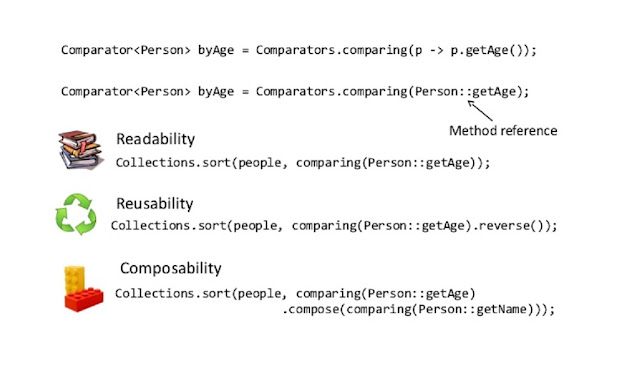
By the way, Sorting an ArrayList has become even easier in Java with a lambda expression, method reference, and various utility methods like comparing() and thenComparing() methods added on the Comparable and Comparator class. See this tutorial gets a feel of sorting ArrayList in Java 8.
Now, let's see below for a full code example of ArrayList Sorting in the custom order in Java:
Java Program to sort an ArrayList in Custom Order using Comparator
Here is a complete code example of sorting an ArrayList in java on both natural and custom orders by using a custom comparator.
package test;
import java.util.ArrayList;
import java.util.Collections;
import java.util.Comparator;
public class ArrayListSortingExample {
private static class SmartPhone implements Comparable {
private String brand;
private String model;
private int price;
public SmartPhone(String brand, String model, int price){
this.brand = brand;
this.model = model;
this.price = price;
}
@Override
public int compareTo(SmartPhone sp) {
return this.brand.compareTo(sp.brand);
}
@Override
public String toString() {
return "SmartPhone{" + "brand=" + brand + ", model=" + model + ", price=" + price + '}';
}
}
private static class PriceComparator implements Comparator{
@Override
public int compare(SmartPhone sp1, SmartPhone sp2) {
return (sp1.price < sp2.price ) ? -1: (sp1.price > sp2.price) ? 1:0 ;
}
}
public static void main(String... args) {
//creating objects for arraylist sorting example
SmartPhone apple = new SmartPhone("Apple", "IPhone4S",1000);
SmartPhone nokia = new SmartPhone("Nokia", "Lumia 800",600);
SmartPhone samsung = new SmartPhone("Samsung", "Galaxy Ace",800);
SmartPhone lg = new SmartPhone("LG", "Optimus",500);
//creating Arraylist for sorting example
ArrayList smartPhones = new ArrayList();
//storing objects into ArrayList for sorting
smartPhones.add(apple);
smartPhones.add(nokia);
smartPhones.add(samsung);
smartPhones.add(lg);
//Sorting Arraylist in Java on natural order of object
Collections.sort(smartPhones);
//print sorted arraylist on natural order
System.out.println(smartPhones);
//Sorting Arraylist in Java on custom order defined by Comparator
Collections.sort(smartPhones,new PriceComparator());
//print sorted arraylist on custom order
System.out.println(smartPhones);
}
}
Output:
[SmartPhone{brand=Apple, model=IPhone4S, price=1000}, SmartPhone{brand=LG, model=Optimus, price=500}, SmartPhone{brand=Nokia, model=Lumia 800, price=600}, SmartPhone{brand=Samsung, model=Galaxy Ace, price=800}]
[SmartPhone{brand=LG, model=Optimus, price=500}, SmartPhone{brand=Nokia, model=Lumia 800, price=600}, SmartPhone{brand=Samsung, model=Galaxy Ace, price=800}, SmartPhone{brand=Apple, model=IPhone4S, price=1000}]
How to sort ArrayList of String in Descending Order in Java?
 ArrayList can also be sorted in descending or reverse order by using Collections.reverseOrder() and Collection.reverseOrder(Comparator cmp).
 Former method will sort in reverse order of natural ordering while later method will sort in the reverse order of specified comparator as shown in following example of sorting ArrayList into reverse order :
//sorting ArrayList in descending or reverse order in Java
List<String> unsortedList = Arrays.asList("abc", "bcd", "ade", "cde");
Collections.sort(unsortedList, Collections.reverseOrder());

System.out.println("Arraylist in descending order: " + unsortedList);


Output:
ArrayList before sorting in reverse order: [abc, bcd, ade, cde]
ArrayList in descending order: [cde, bcd, ade, abc]
How to sort ArrayList of String in Case insensitive Order
ArrayList of String can also be sorted with case-insensitive comparison. String class defines a convenient case insensitive comparator which can be accessed directly like String.CASE_INSENSITIVE_ORDER.If you pass this Comparator to ArrayList.sort() which contains String then those will be sorted accordingly.
Here is an example of sorting ArrayList in a case insensitive order:
//sorting ArrayList on case insensitive order of String
unsortedList = Arrays.asList("abc", "bcd", "ABC", "BCD");
System.out.println("ArrayList before case insensitive sort: " + unsortedList);
Collections.sort(unsortedList, String.CASE_INSENSITIVE_ORDER);
System.out.println("ArrayList after case insensitive sort: " + unsortedList);
Output:
ArrayList before case insensitive sort: [abc, bcd, ABC, BCD]
ArrayList after case insensitive sort: [abc, ABC, bcd, BCD]
How to sort an ArrayList using List.sort() method in Java?
If you want to use the List.sort() method introduced in Java 8, which is an instance method for sorting lists, you can still sort an ArrayList. Here's an example using both natural and custom ordering:
import java.util.ArrayList;
import java.util.List;

public class ArrayListSortExample {

    public static void main(String[] args) {
        // Creating an ArrayList using List.of() method
        List<String> stringList
   = new ArrayList<>(List.of("banana", "apple", "orange", "grape"));

        // Sorting in natural order using List.sort()
        stringList.sort(null);

        // Displaying the sorted ArrayList
        System.out.println("Sorted ArrayList (Natural Order): " + stringList);

        // Creating an ArrayList using List.of() method
        List<Integer> integerList = new ArrayList<>(List.of(5, 2, 8, 1, 3));

        // Sorting in custom order (descending) using List.sort()
       // with Comparator.reverseOrder()
        integerList.sort((a, b) -> b.compareTo(a));

        // Displaying the sorted ArrayList
        System.out.println("Sorted ArrayList (Custom Order - Descending): " + integerList);
    }
}
In this example, stringList.sort(null) is used for natural ordering, and integerList.sort((a, b) -> b.compareTo(a)) is used for custom ordering in descending order. The List.sort() method takes a comparator as an argument, and for natural ordering, passing null is sufficient.
Note that the List.sort() method modifies the list in place and does not create a new sorted list.
How to sort an ArrayList using Stream.sorted() method in Java?
If you want to use the Stream.sorted() method to sort a list in Java, you can do so as follows:import java.util.List; import java.util.stream.Collectors; public class StreamSortExample { public static void main(String[] args) { // Creating a list using List.of() method List<String> stringList = List.of("banana", "apple", "orange", "grape"); // Sorting in natural order using Stream.sorted() List<String> sortedList = stringList.stream() .sorted() .collect(Collectors.toList()); // Displaying the sorted list System.out.println("Sorted List (Natural Order): " + sortedList); // Creating a list using List.of() method List<Integer> integerList = List.of(5, 2, 8, 1, 3); // Sorting in natural order using Stream.sorted() List<Integer> sortedIntegerList = integerList.stream() .sorted() .collect(Collectors.toList()); // Displaying the sorted list System.out.println("Sorted List (Natural Order): " + sortedIntegerList); // Sorting in custom order (descending) using Stream.sorted() List<Integer> sortedDescendingIntegerList = integerList.stream() .sorted((a, b) -> b.compareTo(a)) .collect(Collectors.toList()); // Displaying the sorted list System.out.println("Sorted List (Custom Order - Descending): " + sortedDescendingIntegerList); } }
It's worth noting that the Stream.sorted() method creates a new stream, leaving the original list unchanged.
Summary
In Java, sorting an ArrayList can be accomplished through various approaches, each catering to specific requirements. The primary methods include natural ordering using Collections.sort() and custom ordering through the Comparator interface.
Natural Ordering
The Collections.sort() method is the simplest way to achieve natural ordering. It is applicable when dealing with primitive types or objects that implement the Comparable interface. The advantage lies in its simplicity and conciseness, requiring minimal code.
Natural Ordering
The Collections.sort() method is the simplest way to achieve natural ordering. It is applicable when dealing with primitive types or objects that implement the Comparable interface. The advantage lies in its simplicity and conciseness, requiring minimal code.
However, its drawback arises when sorting custom objects that don't inherently support natural ordering, necessitating the implementation of the Comparable interface.
Custom Ordering
For scenarios demanding more control over sorting criteria, the Comparator interface is employed. Developers can create custom comparators to define specific sorting rules. This approach is versatile, allowing sorting based on various attributes or criteria.
Custom Ordering
For scenarios demanding more control over sorting criteria, the Comparator interface is employed. Developers can create custom comparators to define specific sorting rules. This approach is versatile, allowing sorting based on various attributes or criteria.
However, it involves writing additional code, potentially making it more complex than natural ordering. Custom ordering is particularly beneficial when dealing with complex objects or when the desired sorting logic is not inherent to the object.
Alphanumeric Sorting and Reversal:
Specialized cases, such as sorting alphanumeric strings or reversing the order, are addressed by customizing comparators or using predefined methods like Collections.reverseOrder(). Alphanumeric sorting is advantageous when dealing with mixed data types, ensuring a logical order. Reversal is useful when the default ascending order needs to be flipped.
In summary, the choice between natural and custom ordering depends on the nature of the data and specific sorting requirements. Natural ordering is preferable for simplicity and when objects inherently support it.
Alphanumeric Sorting and Reversal:
Specialized cases, such as sorting alphanumeric strings or reversing the order, are addressed by customizing comparators or using predefined methods like Collections.reverseOrder(). Alphanumeric sorting is advantageous when dealing with mixed data types, ensuring a logical order. Reversal is useful when the default ascending order needs to be flipped.
In summary, the choice between natural and custom ordering depends on the nature of the data and specific sorting requirements. Natural ordering is preferable for simplicity and when objects inherently support it.
On the other hand, custom ordering provides flexibility for complex scenarios but requires additional implementation.
Alphanumeric sorting and reversal are supplementary techniques for addressing specific challenges within the sorting process. Developers should choose the method that best aligns with their specific use case, considering factors like code readability, maintainability, and performance.
Alphanumeric sorting and reversal are supplementary techniques for addressing specific challenges within the sorting process. Developers should choose the method that best aligns with their specific use case, considering factors like code readability, maintainability, and performance.
That’s all about how to sort ArrayList in Java based on the natural order of Object and any custom order by using Custom Comparator. This is a useful technique to know when it comes to comparing and sorting objects in Java. Comparator gives you a lot of power and fine grained control over sorting.
Java 8 enhancements on Comparator API has made this even more popular and by using those features you can easily creator Comparator which are much more readable and reusable. I have explained the new way to sort List of object in Java here, you can also check that article now that you are familiar with custom orders and Comparators in Java.
Let me know if you face any issues while running Sorting ArrayList Example code in Java and I would be glad to help you.
Thanks
Thanks
Java Tutorials you may Like
Also, what is your favorite way to sort an ArrayList in Java? By using List.of() method, by using Collections.sort() method or by using Stream.sort() in Java 8? Let me know in comments.

17 comments :
Should have mention that Object should be implemented Comparable interface in order to them to be sorted in Arraylist in natural order. first natural order is applied and than ascending or descending which determine direction.
I really like different kind of comparator Java provides like reverse comparator which can be used to sort List in descending order, Case Insensitive Comparator which can be used to Sort array in case insensitive order. Can you please give example of sorting arraylist in two different columns e.g. first name and than surname ?
good example on how to sort arraylist in java but I guess this method can also be used to sort other List implementation like Vector and LinkedList, isn't it ?
how to sort arraylist in java - Use Collections.sort
how to sort arraylist of objects in java - Use collections.sort with compareTo
how to sort arraylist in java using comparator - pass Comparator to sort()
how to sort arraylist in descending order in java - use reverseComparator() and pass that to sort
wow I didn't know that there is a built in Comparator exists to compare Strings in CASE INSENSITIVE order. that is kind of nice little find for me. on related note what is difference between an ordered collection or Sorted collection, isn't it both the same ? is ArrayList a sorted collection or ordered collection ?
Is the price comparator working? I tried the code.but it's not behaving as expected.The method compare(SmartPhone sp1, SmartPhone sp2) is overloaded instead of overrididng isn't it?
@Anonymous, you are write compare() expect Object so its overloaded, should have used @Override to prevent that, that is very hard to find bug if you are not using @Override annotation. thanks for pointing it. I will correct it.
what is the use of class which is create inside a interface...
Hi,
i am not satisfied with the program.my query is as :
we need to sort data dynamically according to date wise or int type or some time ascending or descending order.. please assist here...
Thx,
Saurabh
Above code is not compilling in Java7.
Did anyone noticed?
@Anonymous, What is the error you are getting? Can you post compilation error here?
thank you very much for your kind information...
My compiler complained that the interfaces were not implemented. When I let it suggest corrections, it added compare(Object) and compareTo(Object,Object) methods. Further research revealed that both interfaces should have been 'parametized'. Basically, that means just adding to the Class definitions so that the first reads "private static class SmartPhone implements Comparable" and the second reads "private static class PriceComparator implements Comparator"
Apparently the interfaces are written for generic object types, so you have to specify which types you want to handle.
Should be as follows:
public class ArrayListSortingExample {
private static class SmartPhone implements Comparable {
private String brand;
private String model;
private int price;
public SmartPhone(String brand, String model, int price) {
this.brand = brand;
this.model = model;
this.price = price;
}
@Override
public int compareTo(Object sp) {
return this.brand.compareTo(((SmartPhone) sp).brand);
}
@Override
public String toString() {
return "SmartPhone{" + "brand=" + brand + ", model=" + model + ", price=" + price + '}';
}
}
private static class PriceComparator implements Comparator {
@Override
public int compare(Object sp1, Object sp2) {
return (
((SmartPhone) sp1).price < ((SmartPhone) sp2).price) ? -1
: (((SmartPhone) sp1).price > ((SmartPhone) sp2).price) ? 1 : 0;
}
}
and please fix it - preview to be available before author approval...
Thanks for this simple example. I was looking to sort an ArrayList of String alphabetically when I come through this tutorial, It helps me a lot. Thanks a ton.
Some Java8 sorting examples:
Collections.sort(smartPhones,Collections.reverseOrder((SmartPhone p1,SmartPhone p2)->p1.getPrice()-p2.getPrice()));
Collections.sort(smartPhones,Comparator.comparing(SmartPhone::getPrice).reversed());
import java.util.ArrayList;
import java.util.Collections;
import java.util.Comparator;
import java.util.List;
import java.util.stream.Collectors;
public class ArrayListSortingExample {
private static class SmartPhone implements Comparable{
private String brandName;
private String productName;
private int price;
public int getPrice() {
return price;
}
public void setPrice(int price) {
this.price = price;
}
public SmartPhone(String brandName, String productName, int price) {
this.brandName = brandName;
this.productName = productName;
this.price = price;
}
@Override
public int compareTo(SmartPhone smartPhone) {
return Integer.compare(smartPhone.getPrice(), this.price);
}
@Override
public String toString() {
return "SmartPhone{" +
"brandName='" + brandName + '\'' +
", productName='" + productName + '\'' +
", price=" + price +
'}';
}
}
private static class PriceComparator implements Comparator {
@Override
public int compare(SmartPhone o1, SmartPhone o2) {
return Integer.compare(o1.price, o2.price);
}
}
public static void main(String[] args) {
SmartPhone apple = new SmartPhone("apple","Iphone4s",1000);
SmartPhone samsung = new SmartPhone("samsung","Galaxy Ace",500);
SmartPhone lg = new SmartPhone("lg","optimus",200);
SmartPhone huawei = new SmartPhone("huawei","ops",1200);
ArrayList smartPhones = new ArrayList<>();
smartPhones.add(apple);
smartPhones.add(samsung);
smartPhones.add(lg);
smartPhones.add(huawei);
Collections.sort(smartPhones);
System.out.println(smartPhones);
/*smartPhones.sort(new PriceComparator());
System.out.println(smartPhones);
*/
List list = smartPhones.stream().sorted(Comparator.comparingInt(SmartPhone::getPrice).reversed()).toList();
System.out.println(list);
}
}
Post a Comment