What is CLASSPATH in Java? Classpath in Java is the path to the directory or list of the directory which is used by ClassLoaders to find and load classes in the Java program. Classpath can be specified using CLASSPATH environment variable which is case insensitive, -cp or -classpath command-line option or Class-Path attribute in manifest.mf file inside the JAR file in Java. In this Java tutorial, we will learn What is Classpath in Java, how Java resolves classpath and how Classpath works in Java alongside How to set the classpath for Java in Windows and UNIX environment.
I have experience in the finance and insurance domain and Java is heavily used in this domain for writing sophisticated Equity, Fixed income trading applications. Most of these investment banks have written tests as part of their core Java interview questions and I always find at least one question related to CLASSPATH in Java on those interviews.
Java CLASSPATH is one of the most important concepts in Java, but, I must say mostly overlooked. This should be the first thing you should learn while writing Java programs because without the correct understanding of Classpath in Java you can't understand how Java locates your class files.
Also don't confuse Classpath with PATH in Java, which is another environment variable used to find java binaries located in the JDK installation directory, also known as JAVA_HOME.
Unfortunately, Java Programming books like Head First Java don't teach you much about the subtleties of PATH and CLASSPATH. If you really want to test your Java skill, the one book I would suggest reading is Java Puzzlers, whose puzzles and explanations will help more to understand this kind of not so easy concept.
In fact, CLASSPATH is an environment variable that is used by Java Virtual Machine to locate user-defined classes.
As I said In this tutorial we will see How to set up the classpath for java in windows and Linux, java -classpath example in different scenarios, and the use of java -classpath or java -cp.
I have experience in the finance and insurance domain and Java is heavily used in this domain for writing sophisticated Equity, Fixed income trading applications. Most of these investment banks have written tests as part of their core Java interview questions and I always find at least one question related to CLASSPATH in Java on those interviews.
Java CLASSPATH is one of the most important concepts in Java, but, I must say mostly overlooked. This should be the first thing you should learn while writing Java programs because without the correct understanding of Classpath in Java you can't understand how Java locates your class files.
Also don't confuse Classpath with PATH in Java, which is another environment variable used to find java binaries located in the JDK installation directory, also known as JAVA_HOME.
Unfortunately, Java Programming books like Head First Java don't teach you much about the subtleties of PATH and CLASSPATH. If you really want to test your Java skill, the one book I would suggest reading is Java Puzzlers, whose puzzles and explanations will help more to understand this kind of not so easy concept.
Difference between PATH and Classpath in Java
The main difference between PATH and CLASSPATH is that the former is used to locate Java commands while the latter is used to locate Java class files. So let’s start with basics and then we will see some examples and improvisation of Classpath in Java.In fact, CLASSPATH is an environment variable that is used by Java Virtual Machine to locate user-defined classes.
As I said In this tutorial we will see How to set up the classpath for java in windows and Linux, java -classpath example in different scenarios, and the use of java -classpath or java -cp.
By the way, If you have just started learning Java, then I also suggest you follow a structured online course to learn Java like these Java Programming courses for beginners. That will help you to grasp most of the fundamental concepts in Java in a systematic manner.

Here is Step by Step guide for setting Java Classpath in Windows:
How to Set ClassPath for Java in Windows? Example
In order to set Classpath for Java in Windows (any version either Windows XP, Windows 2000, or Windows 10) you need to specify the value of the environment variable CLASSPATH, the name of this variable is not case sensitive and it doesn’t matter if the name of your environment variable is Classpath, CLASSPATH or classpath in Java.Here is Step by Step guide for setting Java Classpath in Windows:
- Go to Environment variable window in Windows by pressing "Windows + Pause “--> Advanced --> Environment variable " or you can go from right click on my computer than choosing properties and then Advanced and then Environment variable this will open the Environment variable window in windows.
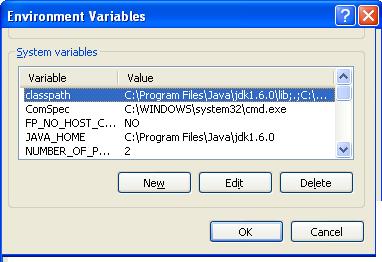
- Now specify your environment variable CLASSPATH and put the value of your JAVA_HOME\lib and also include current directory by including (dot or period sign).
- Now to check the value of Java classpath in windows type "echo %CLASSPATH" in your DOS command prompt and it will show you the value of the directory which is included in CLASSPATH.
- You can also set classpath in windows by using DOS commands like:
$ set CLASSPATH=%CLASSPATH%;JAVA_HOME\lib;
This way you can set the classpath in Windows XP, Windows 2000, or Windows 7 and 8, 10 as they all come with a command prompt.
Setting Java Classpath in UNIX or Linux
To set Classpath for Java In Linux, you can simply export CLASSPATH="your classpath" from either your .bash_profile or .bashrc script which will run whenever your login into your Linux or Unix Machine.Now to check the value of Java CLASSPATH in Linux type "echo ${CLASSPATH}" this will print the value of Classpath in the command prompt.
By using the export command, you can set the classpath for Java in Unix, Linux, Solaris, IBM AIX, or any other UNIX operating system. I hope this example for setting classpath in Java will enable to set classpath by yourself let me know if you face any problem while setting up classpath in Java
By default, Java CLASSPATH points to the current directory denoted by "." and it will look for any class only in the current directory.
Overriding Classpath in Java
You can override classpath in Java, defined by environment variable CLASSPATH by providing option "-cp" or "-classpath" while running Java program and this is the best way to have different classpath for different Java applications running on the same Unix or Windows machine, the standard way to define classpath for Java application is creating start-up script for Java program and set classpath there as shown below :CLASSPATH=/home/tester/classes
$ java -cp $CLASSPATH TestBy default, Java CLASSPATH points to the current directory denoted by "." and it will look for any class only in the current directory.
Different examples of using Classpath in Java
In case you have multiple directories defined in the CLASSPATH variable, Java will look for a class starting from the first directory and only look at the second directory in case it did not find the specified class in the first directory.This is an extremely useful feature of Classpath in java to understand and it’s very useful while debugging Java application or patch release kind of stuff. Let’s see the java -classpath example
I have set my classpath environment variable as CLASSPATH=/home/tester/first:/home/tester/second. Now I have a Test class of different versions in both the first and second directories. When I give the command "java Test" What will happen? Which Test class would be picked?
I have set my classpath environment variable as CLASSPATH=/home/tester/first:/home/tester/second. Now I have a Test class of different versions in both the first and second directories. When I give the command "java Test" What will happen? Which Test class would be picked?
Since the JVM search directory in the order they have listed in CLASSPATH variable it will first go to the "first" directory and if it finds Test.class over there it will not go to /home/tester/second directory. Now if you delete Test.class from /home/tester/first directory it will go to /home/tester/second directory and will pick Test.class from there.
I have used this feature of Java Classpath to test my patch releases, we used to have a folder called "patch" listed as first element in Java CLASSPATH, and any point of time we want to put any debug statement or want to test any bug we just modify Java source file, compile it and generate class file and put that inside patch folder instead of creating JAR file and releasing whole new Java application.
I have used this feature of Java Classpath to test my patch releases, we used to have a folder called "patch" listed as first element in Java CLASSPATH, and any point of time we want to put any debug statement or want to test any bug we just modify Java source file, compile it and generate class file and put that inside patch folder instead of creating JAR file and releasing whole new Java application.
This is very handy if you are working on a large project where you don't have a development environment setup in Windows and your project only runs on a Unix server. This approach is much faster than remote debugging Java applications in Eclipse
It's also worth noting that when you use the java -jar command-line option to run your Java program as an executable JAR, then the CLASSPATH environment variable will be ignored, and also the -cp and -classpath switches will be ignored.
It's also worth noting that when you use the java -jar command-line option to run your Java program as an executable JAR, then the CLASSPATH environment variable will be ignored, and also the -cp and -classpath switches will be ignored.
In this case, you can set your Java classpath in the META-INF/MANIFEST.MF file by using the Class-Path attribute. In short Class-path attribute in manifest file overrides classpath specified by -cp, -classpath or CLASSPATH environment variable.
Now a common question if I have my CLASSPATH variable pointing to current directory "." and I have a class called "Test" inside package "testing" and with below directory structure C:\project\testing\Test.class in my computer.
What will happen if I run the command "java Test" from directory "C:\project\testing\"? will it run?
Now a common question if I have my CLASSPATH variable pointing to current directory "." and I have a class called "Test" inside package "testing" and with below directory structure C:\project\testing\Test.class in my computer.
What will happen if I run the command "java Test" from directory "C:\project\testing\"? will it run?
No, it will not run it will give you:
Exception in thread "main" java.lang.NoClassDefFoundError: Test
Since the name of the class is not Test, instead it’s testing.Test even though your classpath is set to the current directory.
Now, what will happen if I give command java testing.Test from C:\project\testing\ it will again not run and give an error?
Exception in thread "main" java.lang.NoClassDefFoundError: testing/Test
Why because now it looking for a class called Test which is in package testing, starting from the current directory "." but don't find it since there is no directory called "testing after this path "C:\project\testing\".
To run it successfully you need to go back to directory C:\project and now run
C:\project>java testing.Test and It will run successfully because of Classpath issues I prefer to use Eclipse rather than running a Java program from the command prompt.
How to Fix errors related to Classpath in Java
If you are working in Java, you must have faced some errors and exception related to the classpath in java, two most common issues related to java classpath is ClassNotFoundException and NoClassDefFoundError.I have seen that many Java developer tries to solve this error by trial and error; they just don’t look beyond the hood and try to understand what the reason for this java classpath related errors is. They often misunderstood that these two errors are the same also.
Here is the reason for these Java classpath errors:
ClassNotFoundException is an Exception and will be thrown when the Java program dynamically tries to load a Java class at runtime and doesn’t find the corresponding class file on the classpath. Two keywords here are “dynamically” and “runtime”.
Here is the reason for these Java classpath errors:
ClassNotFoundException is an Exception and will be thrown when the Java program dynamically tries to load a Java class at runtime and doesn’t find the corresponding class file on the classpath. Two keywords here are “dynamically” and “runtime”.
A classic example of these errors is when you try to load the JDBC driver by using Class.forname(“driver name”) and are greeted with java.lang.ClassNotFoundException: com.mysql.jdbc.Driver. So this error essentially comes when Java tries to load a class using the forName() or by loadClass() method of ClassLoader.
The key thing to note is that presence of that class on the Java classpath is not checked on compile time. So even if those classes are not present on the Java classpath your program will compile successfully and only fail when you try to run.
On the other hand, NoClassDefFoundError is an Error and more critical than ClassNotFoundException which is an exception and recoverable. NoClassDefFoundError comes when a particular class was present in Java Classpath during compile time but not available during run-time.
On the other hand, NoClassDefFoundError is an Error and more critical than ClassNotFoundException which is an exception and recoverable. NoClassDefFoundError comes when a particular class was present in Java Classpath during compile time but not available during run-time.
A classic example of this error is using log4j.jar for logging purposes and forgot to include log4j.jar on the classpath in java during run-time. to read more about logging in to Java see.
The keyword here is, the class was present at compile time but not available at run-time. This is normally occurring due to any method invocation on a particular class that is part of the library and not available on the classpath in Java. This is also asked as common interview questions as
“What is the difference between NoClassDefFoundError and ClassNotFoundException Exception in Java” or “When do you see NoClassDefFoundError and ClassNotFoundException Exception in Java”.
“What is the difference between NoClassDefFoundError and ClassNotFoundException Exception in Java” or “When do you see NoClassDefFoundError and ClassNotFoundException Exception in Java”.
By the way, NoClassDefFoundError can also come due to various other reasons like static initializer failure or class not visible to Classloaders in the J2EE environment. Read 3 ways to resolve NoClassDefFoundError in Java for complete details.
I hope you find this Java Classpath tutorial useful, please let me know if you have any doubts or any questions related to "How to set the classpath for java" and I would be happy to answer :) keep learning. Your suggestions and comments are always welcome.
If you like to read UNIX command tips you may find 10 tips for using the find command in Linux, 10 tips to increase speed on Unix command and 10 basic networking Commands in Unix useful. That's all on What is Classpath in Java, How Classpath works in Java, How to set Classpath in Java on Windows and Linux, and how to deal with Classpath issues in Java.
Other Java tutorials you may like:
Summary of CLASSPATH in Java
1. Classpath in Java is an environment variable used by Java Virtual machine to locate or find class files in Java during class loading.
2. You can override the value of Classpath in Java defined by the environment variable CLASSPATH by providing the JVM command-line option –cp or –classpath while running your application.
3. If two classes with the same name exist in Java Classpath then the class which comes earlier in Classpath will be picked by Java Virtual Machine.
4. By default CLASSPATH in Java points to the current directory denoted by "." and it will look for any class only in the current directory.
5. When you use the -jar command-line option to run your program as an executable JAR, then the Java CLASSPATH environment variable will be ignored, and also the -cp and -classpath switches will be ignored and, In this case, you can set your java classpath in the META-INF/MANIFEST.MF file by using the Class-Path attribute.
6. In Unix or Linux operating system, Java Classpath contains names of the directory with a colon “:” separated, On Windows Java Classpath will be semicolon “;” separated while if you defined java classpath in Manifest file those will be space separated.
7. You can check value of classpath in java inside your application by looking at following system property “java.class.path” System.getProperty("java.class.path")
Class-Path attribute is used to contain classpath inside the manifest file. Also, make sure that your manifest file must end with a blank line (carriage return or new line), here is an example of java classpath in the manifest file.
Main-Class: com.classpathexample.Demo_Classpath
Class-Path: lib/tibco.jar lib/log4j.jar
Class-Path attribute is used to contain classpath inside the manifest file. Also, make sure that your manifest file must end with a blank line (carriage return or new line), here is an example of java classpath in the manifest file.
Main-Class: com.classpathexample.Demo_Classpath
Class-Path: lib/tibco.jar lib/log4j.jar
8. It’s also important to note that the path specified in the manifest file is not absolute instead they are relative from the application jar’s path. For example, in above if your application jar file is in C:\test directory you must need a lib directory inside test and tibco.jar and log4j.jar inside that.
9. ClassNotFoundException is an Exception and will be thrown when the Java program dynamically tries to load a particular Class at Runtime and doesn’t find that on Java classpath due to the result of Class.forName() or loadClass() method invocation.
10. NoClassDefFoundError comes when a particular class was present in Java Classpath during compile time but not available during runtime on Classpath in Java.
I hope you find this Java Classpath tutorial useful, please let me know if you have any doubts or any questions related to "How to set the classpath for java" and I would be happy to answer :) keep learning. Your suggestions and comments are always welcome.
If you like to read UNIX command tips you may find 10 tips for using the find command in Linux, 10 tips to increase speed on Unix command and 10 basic networking Commands in Unix useful. That's all on What is Classpath in Java, How Classpath works in Java, How to set Classpath in Java on Windows and Linux, and how to deal with Classpath issues in Java.
Other Java tutorials you may like:


 Posts
Posts


63 comments :
Very nice article. I did not know about the -jar classpath implications. How do you specifiy classpath in META-INF (relative and absolute) ?
You forgot to mention "endorsed" folder.
Thanks Sandeep. Given importance of Classpath and its usages this is my small effort :)
Hi Adam,
Thanks you liked the article. A Class-Path entry is used to specify jar's you would like to include in your Claspath, for example:
Class-Path: tibco.jar tibrvjms.jar tibco/tibcohawk.jar
With this header, the classes in the files tibco.jar, tibrvjms.jar, and tibco/tibcohawk.jar will serve as extensions for purposes of the applet or application. The URLs specified in Class-Path entry are given relative to the URL of the JAR file of the applet or application.
I do not about "endorsed" folder though , would be great if you could provide some more details to us.
Thanks
Javin
JAVA_HOME/lib/endorsed - jars from this directory are also loaded. Intended use is to replace classes shipped with java, especially for technologies are in development between major java releases.
Location of this directory can be changed by setting system properties.
There are also these parameters, but I am not sure what the "intended" use is for them.
-Xbootclasspath:bootclasspath
-Xbootclasspath/a:bootclasspath
-Xbootclasspath/p:bootclasspath
Also comment to this:
"By default CLASSPATH points to current directory denoted by "." and it will look for any class only in current directory."
The way it works, if you do not specify neither -cp nor -classpath and CLASSPATH is not set, then the classpath defaults to "."
Starting with java 1.6 you can also specify a * in a classpath, e.g.:
/mylibs/*
this is going to be expanded to include all files ending in .jar or .JAR
Thank you very much Adam for letting us know about "endorsed" directory and adding value to this blog. I am too not sure about -Xbootclasspath:bootclasspath but will post when I come to know about it.
Thanks
Javin
I have a doubt in this tutorial sir.
You said that classpath is an env var which locates .class files stored in our computer.
But while writing programs, we generally give something like "C:\jdk1.4.1\bin;"
But the .class files of our programs may be in any directory.
So how does the system locate the .class file.
i appreciate your efforts in providing detailed information about class paths. Unfortunately, it makes me feel even dense because I still cannot figure out the solution to my problem when trying to run my own projects in sphinx
is there a more detailed sphinx link (besides what they have on their main site) that will help me more with my problem im having? thank you in advance! :) Exception in thread "main" java.lang.NoClassDefFoundError: cmu.edu.sphinx.demo.RobotTest
Caused by: java.lang.ClassNotFoundException: edu.cmu.sphinx.demo.RootTest
I know this might not have enough information but i really need someone to help me walk through this. HELP!
Kind regards,
Dekita
great article about java classpath mate, I have read couple of articles on java claspath but this one is simply great especially your tip on using classpath for debugging in java. by any chance do you know how to set classpath for eclipse and netbeans IDE ?
Thank Anonymous you like my java classpath tutorial.I really like you find my experience useful.as far as setting java classpath on eclipse and netbeans they have there own build configuration in Eclipse just right click the project and select properties--> build path it will show you libraries which are in java classpath.
Hi, Can we set java classpath at run time ? for example setting java classpath to find out new .class files or modified class files ?
You can also use java -verbose option to find out what classes are loading at run-time from classpath in java. Also from JDK 6 onwards you can use
wild-cards in classpath for example C:\java-classpath-test> javac -cp C:\Java\JDK1.6\lib\* and it will include all jar files form lib folder.
what is difference between PATH and Classpath in Java ? I always get confused between these two Can you please help ? Also how to set both PATH and CLASSPATH ?
I have read many articles on Java classpath but most of them don’t explain how exactly classpath works in Java and How does JVM finds java classes. This becomes more important if you have same class in more than two jars in classpath
If you are using Java 1.6 and using wildcard to specify classpath make sure you don't have anything else than .jar file in your directory specified by wildcard , otherwise you could run into problem of "invalid classpath".
e.g. C:\Java\JDK1.6\lib\* will include everything inside lib , so if you have something which is not jar e.g. a directory test , you will run into problem.
Hi Javin,
Great article you've got there. I have a small problem. I happened to add the line
CLASSPATH=""
into /etc/environment file. Perhaps a stupid thing to do.
Now, though I can still compile (javac) from the terminal, I can't run (java) anymore. All return NoClassDefFoundError. Even after removing the line I added. Please help.
Regards,
Nay
perhaps you would like to change the title of post as "How to set Classpath for Java" which is more suitable.Claspath in Java is tricky until you have complete knowledge and it can be pick and overridden from various places e.g.
1) default classpath current directory "."
2) Classpath Environment variable
3) path provided by option -cp and -classpath
4) Classpath specified in Manifest file if you are running using java -jar option.
Hi, is there any difference on setting classpath in windows XP and windows 7, I am going to buy new windows 7 license and wondering about setting PATH and Classpath on that,Please help.
Can you also write about how to set CLASSPATH and PATH in Eclipse IDE and Ubuntu Linux.
Nice tutorial. You can also refer this link to to set environment variables PATH, CLASSPATH and JAVA_HOME for compiling and running of Java applications. http://www.a2ztechguide.com/2011/10/setting-environment-variables-javahome.html
i had no problem, until i have installed "window builder pro" and have deleted again. Then i could not run my project. But thank you very much. "Classic example of this error is using log4j.jar for logging purpose and forgot to include log4j.jar on classpath in java during run-time." it was the answer of my problem..:) i dont know, how it was deleted from my classpath. But it's going now.
Why do you need to set ClassPath in Java explicitly, Can't it get it from jar file and execute from there ?
@Anonymous, yes you can setup Classpath inside Jar file in Java. Manifest file is used for same purpose.
Very nice article. I have been reading your posts for some time. I really enjoyed all this brain food. Thanks a lot for sharing...Keep writing..
why don't you set a smaller font? this is too big!
i am not able to execute jar command. i dont know what to install for executing jar command,it showing command not found, also their is no file called jar in "C:\Program Files\Java\jdk1.6.0\bin".
Thank you,
I agree Understanding of ClassPath is important in order to avoid and debug notorious ClassNotFoundException and NoClassDefFoundError and you have done a good job on explaining both how java picks classes based on classpath and how to set classpath for java.
when i have compiled my servlet program its compiling successful while running its generating class not found exception and i am using windows vista
Hi, This my attempt to get some advice on an issue we're experiencing. Evrytime an auto update takes place our server gets wacked. here's the classpath setup.
Here is what I think the problem is…
There is a batch file named setclasspath.bat in D:\SafeWatch\Tomcat\bin on the Safewatch server.
This batch file references an environment variable named JAVA_HOME.
This environment variable has a value of C:\Program Files\Java\j2re1.4.2_08.
Java version 1.4.2_08 is the current java version running on the server…
I wonder if there could be a “Variable’ inserted in the Java-Home path setup that provides the latest “Java update Version” value after the update takes place.
ex: C:\Program Files\Java\%UpdateVersioNumber%
I'm don't know Java but been asked to resolve this challange.
thanks for your consideration.
@Anonymous. you could possibly write a script which can check each java folder and can setup JAVA_HOME accordingly. look on PERL or shell script or even a simple DOS script if you are running on windows.
sometimes it happens when we compile java program on cmd prompt ,it displays message 'javac' is not recognized as an internal or external command,operable batch or program file even after setting the classpath,why so?
I still don't get it. Anytime I create a Java app I need to add that path to my system's environment variable or have a special startup config to do this? What's the point of putting things into packages and specifying where those packages are if that information's just ignored? What causes the information to be spontaneously lost in the middle of development where class that worked perfectly fine is suddenly the cause of CLASSPATH errors?
hi!! I have downloaded a separate driver file(.jar)for oracle and it needs to be included in the classpath.Can you please tell me how should I do it? I am using jdk6 oracle 10g.where should I place that jar file? IN WHICH FOLDER?
Hi Apurva, it can be any folder, you just need to add that folder on your Classpath ( an env variable, if you type echo %classpath% in windows cmd prompt you can see its value. if you want to avoid that hassle then put oracle driver.jar in JAVA_HOME/lib folder which mostly remain in classpath.
how to set Classpath for java on window xp pzl responce in details
how to set classpath for java on windows xp
Hi Thakur, Steps for setting ClassPath in Windows XP is exactly similar to steps given here. Please let me know if you face any specific issue while setting Classpath in windows 7 by following above steps.
There is a batch file named setclasspath.bat in D:\SafeWatch\Tomcat\bin on the Safewatch server.
This batch file references an environment variable named JAVA_HOME.
This environment variable has a value of C:\Program Files\Java\j2re1.4.2_08.
Java version 1.4.2_08 is the current java version running on the server…
I wonder if there could be a “Variable’ inserted in the Java-Home path setup that provides the latest “Java update Version” value after the update takes place.
ex: C:\Program Files\Java\%UpdateVersioNumber%
I'm don't know Java but been asked to resolve this challange.
thanks for your consideration.
Hi,
Thanks for the tutorial which helped me understand the concept of classpaths. But I still can't figure out why it isn't working with me. I'm using eclipse on Linux. But when I tried running the program using the console, I always get Exception in thread "main" java.lang.NoClassDefFoundError: Main (wrong name: fib/Main). I even tried giving the classpath "." using the option -cp, but I still have the error.
I'm still a beginner and I don't know what to do, I was wondering if you could help me please.
Why class path is required for compiling java classes.... So tell me Why is required??
Javin,
Love the effort that you put to write these tech articles. Big fan. Keep it up buddy. We need more people like you on this forum.
Caused by: java.lang.NoClassDefFoundError: interfaceFachada/IFachada
at java.lang.Class.getDeclaredFields0(Native Method)
at java.lang.Class.privateGetDeclaredFields(Class.java:2291)
at java.lang.Class.getDeclaredFields(Class.java:1743)
at org.apache.catalina.util.Introspection.getDeclaredFields(Introspection.java:87)
at org.apache.catalina.startup.WebAnnotationSet.loadFieldsAnnotation(WebAnnotationSet.java:261)
at org.apache.catalina.startup.WebAnnotationSet.loadApplicationServletAnnotations(WebAnnotationSet.java:140)
at org.apache.catalina.startup.WebAnnotationSet.loadApplicationAnnotations(WebAnnotationSet.java:67)
at org.apache.catalina.startup.ContextConfig.applicationAnnotationsConfig(ContextConfig.java:405)
at org.apache.catalina.startup.ContextConfig.configureStart(ContextConfig.java:881)
at org.apache.catalina.startup.ContextConfig.lifecycleEvent(ContextConfig.java:369)
at org.apache.catalina.util.LifecycleSupport.fireLifecycleEvent(LifecycleSupport.java:119)
at org.apache.catalina.util.LifecycleBase.fireLifecycleEvent(LifecycleBase.java:90)
at org.apache.catalina.core.StandardContext.startInternal(StandardContext.java:5173)
at org.apache.catalina.util.LifecycleBase.start(LifecycleBase.java:150)
i have created jar file with Class-Path: lib/ojdbc14.jar
the jar file is working properly in Windows but same jar file is not working in linux. I have to explicitly set the classpath or directly insert the ojdbc14.jar file without lib folder.
HI
I have installed JDK1.7 in my system.
I have set path environment variable(C:\Program Files (x86)\Java\jdk1.7.0_17\bin)
I have complied sample program FirstJava.java as shown below.
javac FirstJava.java.
I complied successfully. FirstJava.class is also formed. But when I try run the .class file I am getting error as shown below..
java FisrtJava
Error: could not open `C:\Program Files\Java\jre6\lib\amd64\jvm.cfg'.
Kindly help me out with this error..
Thanks in advance
Thanks a ton buddy :-). I always used to get confused between PATH and CLASSPATH even though i went through many articles.
But i have one question:
you have successfully set path and classpath. You have your workspace in a different directory. Now, how does JVM know about these classfiles when they are in a different directory???
@Myle
Check whether you have installed jre along with jdk.. Also check in the control panel whether the JVM is there or not..
prathap
java training in chennai
I have a question, What happens if you have two classes with same name and from same package but on different JAR, which one will be loaded by JVM or ClassLoader? We have created a class to hide same class from one of the open source library and we are facing issues, when sometime class from open source library got picked up, against the one which we have written. We have not customized classloader and only bootstrap, extension and application classloader are in use, i.e. it's typical core java application. Please advice.
Hi thanks for such a nice blog. After going through your blog, i understood what a classpath is. I feel motivated after reading your blog. Will get back to your blog for more learning.
Thanks n regards
Jen
Javin.. you are awesome....I like your posts.....you have very good narration skills....
ButtonMoveApplet.java:5: error: error while writing ButtonMoveApplet: ButtonMove
Applet.class (Access is denied)
public class ButtonMoveApplet extends Applet
^
I HAVE THIS ERROR PLS HELP
Thanks for post, at Setting Java Classpath in Windows part in step 3 it should be echo %CLASSPATH% not echo %CLASSPATH. Keep blogging, thanks again.
Could you please provide zoom option for the Environment Variables window at the top. It is hard to see the value you have given, to take as an example.
Awesome article. loved it
Several people have asked "Where do I specify the class path?" Some haven't received a satisfactory answer. Let me offer an approximately correct and hopefully useful answer. Critical feedback is welcome.
Java can look for a class in another project or in a library (jar). You give it an ordered list of places to look for classes. That's called a "class path".
Use Project > Properties > Java Build Path to tell the Java compiler (JDK) where it can find classes that your code references at compile time. Making the list complete and in the right order may clear up a build error.
Use launch configurations (menu Run > Run [or Debug] Configurations > Classpath tab) to tell the Java runtime (JRE) where it can find classes that your code wants to load dynamically at run time. Making the list complete and in the right order may clear up a ClassNotFoundException.
@nomodes, I believe you are talking about how to specify classpath in Eclipse? isn't it?
ClassNotFoundException: you say that at compile time, claaspath is not checked for a particular class so exception occurs while dynamically loading a class which is nogt present in the classpath.
Later in NoClassDefFoundError, you say that it happens because a class was present in classpath during compilation but later could not found at runtime. This differs from the first explanation which says classpath is not checked at compile time.
Please clearify.
Sorry if i missed anything :)
Thanks.
Great article! :)
currently, i am having a problem with classpath :(. I am developing an eclipse plugin. In this plugin, i compile a class that has a reference to other classes (i wrote that classes). At this point, that classes dont stay in classpath. So, i need to pass that classes to the classpath. However, now i want to execute the compiled class and throws NoClassDefFoundError =(. Do you know how to solve this problem? :)
Sorry if you dont understand me, english inst my idiom, Clearly :P
very helpful article, it help me solve some daily problems!
Nope. Too much information.
I simply want to be able to set up my Windows 7 system so that I do not have to enter "PATH" and "CLASSPATH" each time I desire to run a Java program.
Can someone please just set out the steps -- simply and clearly -- without a load of explanation that I will not understand anyway?
Hello @Billy, here are the steps to setup PATH in Windows 7 system, no explanation just steps.
Thanks.
it should be echo %classspath%
OJDBC Jar file issue-
I had similar issue of NoClassDefFoundError when program is trying to locate Oracle JDBC Driver class. The code worked fine in Local IDE , but on linux box, it is throwing this error. I had set up my classpath properly, and have explicitly called out the statement - Class.forName("oracle.jdbc.driver.OracleDriver"); in order to register this driver for my program.
After debugging, got discivered, the OJDBC jar which I cpied from Windows to Linux using WINSCP has been copied well, there is size difference when compared. So, just re copy it and code works.
Just adding as it might be one of the possible causes.
Thank you Anonymous, that's a very useful information which can potentially save days for beginners and experienced a like, appreciate your sharing.
Post a Comment