Wednesday, October 28, 2026

I Tried 20+ Excel Courses on Udemy - Here Are My Top 5 Recommendations for 2026-27

Top 5 Udemy Courses to Learn Excel and Cheatsheet

Hello guys, Microsoft Excel remains the most widely used spreadsheet software across the globe. Despite the rise of tools like Google Sheets, Airtable, and Tableau, Excel is still the go-to solution for everything from budgeting and forecasting to complex data analysis and automation.

In 2026, Excel has evolved beyond traditional formulas and charts. With seamless integration of Power Query, Power Pivot, dynamic arrays, and even Python scripting, Excel continues to adapt to the needs of modern data professionals and business users.

Whether you’re a beginner or someone who has used Excel for years, the latest features demand updated skills.

Udemy offers a wide range of Excel courses, but choosing the right one can be overwhelming.

That’s why I’ve handpicked the top 5 Excel courses on Udemy for 2026, based on content quality, instructor reputation, real-world application, and student feedback.

I am not suggesting more than 5 course because I found if you join more than 5 courses then you are unlikely to finish any of them. It’s better to stick with the best ones and try to finish them.

Let’s dive in.

5 Best Udemy Courses to learn Microsoft Excel in 2026

Without any further ado, here are the best online courses you can join to learn Microsoft Excel on Udemy. The list include both beginner and advanced level Excel course so that you can truly master Excel in 2026.

1. Microsoft Excel— Excel from Beginner to Advanced (1M+ Students)

Instructor: Kyle Pew
Duration: 21.5 hours
Level: Beginner to Advanced

Why it Stands Out:

This is hands down one of the most comprehensive Excel courses on Udemy. It’s a full-spectrum learning path that starts with the basics (formulas, formatting, shortcuts) and progresses through intermediate topics like data validation and conditional formatting.

You’ll then move on to advanced skills like pivot tables, macros, and VBA basics.

Kyle Pew’s structured teaching and clear explanations make it ideal for learners who want to grow their Excel expertise in stages without jumping between multiple courses.

Perfect for: Office professionals, students, and job seekers who want a solid all-round foundation in Excel.

Here is the link to join this course — Microsoft Excel — — Excel from Beginner to Advanced

2. Master Microsoft Excel Macros and Excel VBA

Want to automate tasks in Excel or create custom workflows? This course takes a deep dive into VBA (Visual Basic for Applications), making it perfect for analysts, accountants, or any Excel power user looking to supercharge productivity.

Instructor: Kyle Pew
Duration: 17 hours
Level: Intermediate to Advanced

Why it Stands Out:

If you’re looking to automate repetitive tasks and build Excel tools or dashboards, this course is the gold standard for learning VBA (Visual Basic for Applications).

Kyle Pew walks you through creating custom macros, user forms, automation workflows, and interacting with external data sources.

Unlike some VBA courses that assume coding knowledge, this one is beginner-friendly and emphasizes practical problem-solving.

Perfect for: Analysts, operations professionals, or anyone looking to turn Excel into a powerful automation tool.

Here is the link to join this course— Master Microsoft Excel Macros and Excel VBA

3. Microsoft Excel — Data Analysis with Pivot Tables

Pivot tables are among Excel’s most powerful features. This focused course from Maven Analytics will teach you how to summarize, analyze, and extract insights from complex datasets using pivot tables and pivot charts.

Instructor: Maven Analytics
Duration: 6.5 hours
Level: Beginner to Intermediate

Why it Stands Out:

Pivot tables are the heart of Excel-based data analysis, and this course offers a focused and clear breakdown of everything you need to know about them.

You’ll learn how to use pivot tables for slicing, dicing, filtering, and summarizing large datasets — without writing a single formula.

What makes this course shine is its business-focused examples that help you build reports like a pro, even if you’ve never used pivot tables before.

Perfect for: Data analysts, marketers, and finance professionals who need quick insights from raw data.

Here is the link to join this course — Microsoft Excel — — Data Analysis with Pivot Tables

4. Unlock Excel VBA and Excel Macros

Leila Gharani is one of the best Excel instructors out there. This course is project-based and teaches VBA with real-world tasks like invoice creation, report generation, and automation techniques you can apply immediately at work.

Instructor: Leila Gharani
Duration: 8.5 hours
Level: Intermediate

Why it Stands Out:

As I said, Leila Gharani is a Microsoft MVP and Excel YouTube star known for her clear teaching and creative problem-solving techniques. This course uses project-based learning to teach Excel automation using macros and VBA.

Rather than abstract concepts, you’ll build six real-world tools — — like invoice generators and auto-reporting templates — — giving you something you can use immediately at work.

Perfect for: Learners who enjoy hands-on, project-driven courses and want to automate Excel without learning programming from scratch.

Here is the link to join this course — Unlock Excel VBA and Excel Macros
5. Advanced Excel Formulas and Functions

This course is for those who already know Excel basics and want to master its advanced formula arsenal — — INDEX/MATCH, XLOOKUP, dynamic arrays, LET, LAMBDA, and more.

If Excel is part of your daily data job, this course will pay off immediately.

Instructor: Chris Dutton (Maven Analytics)
Duration: 9 hours
 Level: Intermediate to Advanced

Why it Stands Out:

This course dives deep into Excel’s most powerful functions — — from INDEX/MATCH and XLOOKUP to the new dynamic array functions like FILTER, SORT, and UNIQUE.

It even covers advanced logic, error handling, and nested functions for building robust formulas.

Chris Dutton excels at simplifying complex concepts. You won’t just learn the functions— you’ll understand when and why to use them.

Perfect for: Analysts, auditors, and professionals who want to write better, faster, and smarter Excel formulas.

Here is the link to join this course — Advanced Excel Formulas and Functions

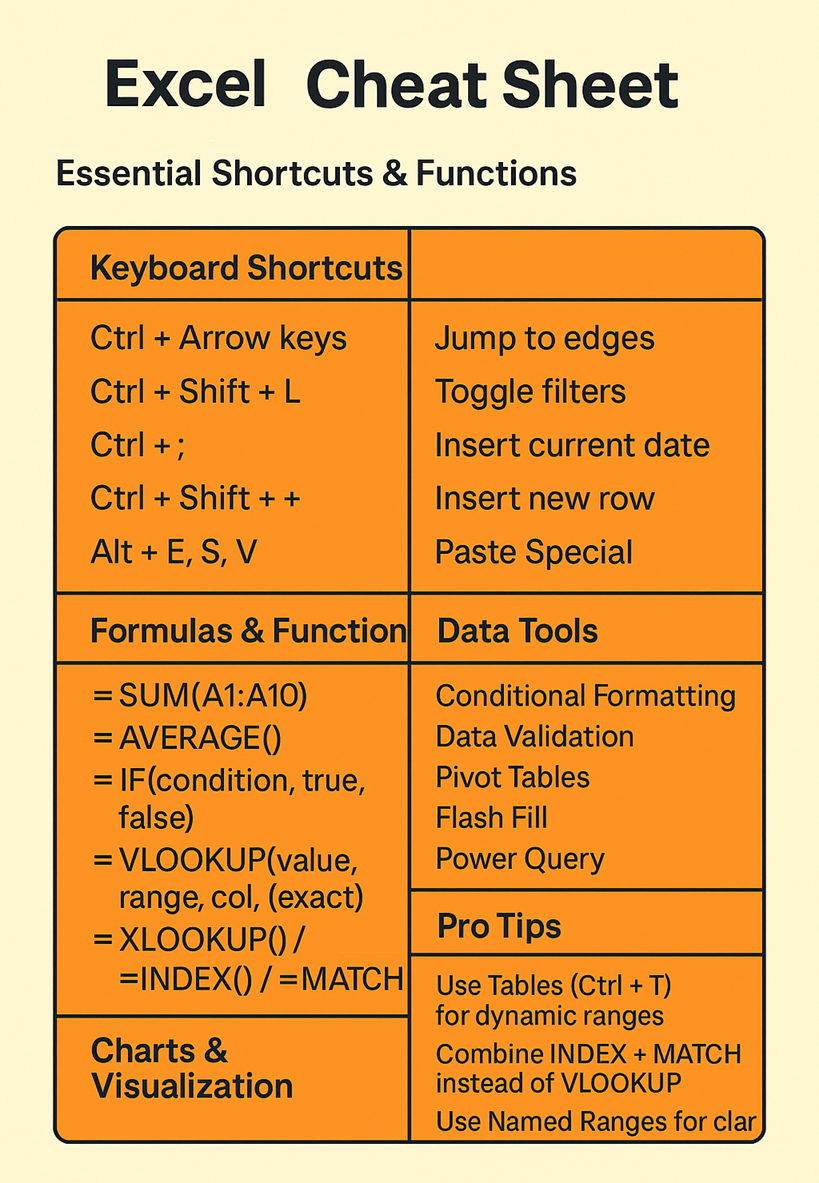
Microsoft Excel Cheat Sheet

Here is a nice MS Excel cheat sheet with Essential Shortcuts & Functions

Keyboard Shortcuts

  • Ctrl + Arrow keys — — Jump to edges
  • Ctrl + Shift + L — — Toggle filters
  • Ctrl + ; — — Insert current date
  • Ctrl + Shift + “+” — — Insert new row
  • Alt + E, S, V — — Paste Special

Formulas & Functions

  • =SUM(A1:A10)
  • =AVERAGE()
  • =IF(condition, true, false)
  • =VLOOKUP(value, range, col, [exact])
  • =XLOOKUP() *(for newer Excel versions)*
  • =INDEX() / =MATCH()

Data Tools

  • Conditional Formatting
  • Data Validation
  • Pivot Tables
  • Flash Fill
  • Power Query

Charts & Visualization

  • Insert Chart: Alt + F1
  • Sparklines
  • Recommended Charts

Pro Tips

  • Use Tables (Ctrl + T) for dynamic ranges
  • Combine INDEX + MATCH instead of VLOOKUP
  • Use Named Ranges for clarity

Conclusion

In 2026, Excel is not just a spreadsheet — it’s a data analysis platform, a business reporting engine, and even a lightweight development tool. Mastering Excel opens doors in almost every industry — — from finance and marketing to engineering and operations.

If you’re unsure where to start:

No matter your career level, investing in one of these Excel courses can give you an edge in 2026 and beyond.

Tip: Start with one course and commit 30 minutes a day— you’ll be amazed at the results in just a few weeks.

    Friday, August 14, 2026

    Top 6 Microsoft Excel Online Courses for Beginners in 2026 - Best of Lot

    Hello guys, If you are learning Microsoft Excel or want to learn Excel and looking for the best online courses, you have come to the right place. In the past, I have shared some advanced Excel courses to learn things like VBA and Macros, and in this article, I am going to share more comprehensive Excel courses to learn Microsoft Excel in depth. These are the best MS Excel courses from sites like Udemy, Pluralsight, and Coursera, and thousands of programmers, developers, tech, and non-tech people have joined these courses to learn this valuable skill, and you can do the same. Microsoft Excel is one of the most essential tools for IT professionals. It's not only the most common spreadsheet tool but also offers powerful charting and analytical capability.

    Tuesday, April 28, 2026

    I Tried 40+ Microsoft Excel Courses on Udemy: Here Are My Top 7 Recommendations for 2026

    7 Best Udemy Courses to Learn Microsoft Excel

    Hello guys, if you have worked as an IT professional no matter whether you are a Developer, Data Scientist, Project Manager, System Administrator or Business Analyst, there is high chance that you may have come across Microsoft Excel in your career.

    If you want o master Excel and looking for resources then you have come to the right place.

    Earlier, I have shared best free Excel courses and best paid Excel courses as well as advanced Excel VBA courses but a lot of you asked me to share best Excel courses from Udemy, which are both affordable and suitable for 2026.

    So here we are, in this article, I am going to share 7 Excel courses from Udemy which you can join in 2026.

    Microsoft Excel remains one of the most powerful tools for data analysis, business intelligence, and everyday office tasks and that’s why its important for every IT Professional to learn it.

    Whether you’re a beginner trying to understand the basics or an advanced user looking to master Excel’s automation and analytical capabilities, there’s always more to learn in Excel.

    in 2026, Excel’s integration with AI tools, automation, and advanced formulas makes it a crucial skill for professionals in every industry.

    In this post, I am going to highlight the 7 best Udemy courses to master Microsoft Excel and why learning Excel is essential for your career.

    Though, if you are in rush and just need an Excel course to start with then you can start with Microsoft Excel — — Excel from Beginner to Advanced course on Udemy. This is probably the most popular Excel course on Udemy and suitable for beginners.

    It also cover almost all popular Excel versions like Excel 2010, 2013, 2016, Excel 2019, Office 365/2024 including the latest one.

    Why Learn Microsoft Excel in 2026?

    Before we dive into the best Excel courses, let’s take a look at why learning Excel in 2026 is such a valuable skill in today’s workplace:

    • Universal Tool: Excel is used across industries — — whether you’re in finance, marketing, IT, or even healthcare. It’s a universal language for data management, analysis, and reporting.
    • Powerful for Data Analysis: Excel is capable of performing everything from simple data entry to complex statistical analysis. Tools like Pivot Tables, advanced formulas, and macros make Excel essential for business intelligence and decision-making.
    • Automation: With the ability to use VBA (Visual Basic for Applications) and Macros, Excel allows users to automate repetitive tasks, saving time and boosting productivity
    • Integrating AI: The 2024 and 2025 versions of Excel incorporate AI-powered features, making data prediction and analysis more intuitive and efficient. Excel’s role in data science, thanks to its AI capabilities, continues to grow.

    In short, Excel is a must know tool for IT professional and from developer to data scientists and project manager to business analyst should learn Excel to become more productive in their job.

    And, if you can’t wait, just start with the Microsoft Excel — Excel from Beginner to Advanced course on Udemy, its my favorite beginner level online training course to learn Excel basics.

    7 Best Udemy Courses to Learn Microsoft Excel in 2026

    Without any further ado, here are the best Excel training courses you can join on Udemy. All of these courses are completely online and suitable for beginners.

    Many of these excel training courses also cover advanced excel topics like pivot table, advanced formulas, data visualization, and macros.

    1. Microsoft Excel — Excel from Beginner to Advanced

    • Students: 1,535,057
    • Why Take This Course: This bestselling course covers everything from the basics of Excel to advanced topics like Pivot Tables, advanced formulas, and data analysis techniques.
    • It’s a complete package, offering lifetime access and a step-by-step approach that caters to all learners.
    • What You’ll Learn: Microsoft Excel 2010, 2013, 2016, Excel 2019, Office 365/2024; beginner to advanced techniques.

    Here is the link to join this course — — Microsoft Excel — — Excel from Beginner to Advanced

    2. Microsoft Excel — Excel from Beginner to Advanced

    • Students: 57,524
    • Why Take This Course: This course offers a comprehensive guide to Excel, from beginner-level basics to advanced techniques.
    • It’s especially useful for those working with Office 365 or any other version of Excel.
    • What You’ll Learn: All Excel basics, plus advanced techniques for data analysis, dashboards, and automation.

    Here is the link to join this course — — Microsoft Excel — — Excel from Beginner to Advanced

    3. The Ultimate Microsoft Excel Mastery Bundle — 8 Courses

    • Students: 10,835
    • Why Take This Course: This bundle provides incredible value, offering eight courses that take you from a complete beginner to an advanced Excel user.
    • Whether you’re looking to become an Excel power user or specialize in areas like data analysis or automation, this course has you covered.
    • What You’ll Learn: Excel basics, advanced formulas, data analysis, Pivot Tables, and more.

    Here is the link to join this course — — The Ultimate Microsoft Excel Mastery Bundle — — 8 Courses

    7 Best Udemy Courses to Learn Microsoft Excel

    4. Microsoft Excel: Beginner to Advanced in Animation + AI

    • Students: 36,606
    • Why Take This Course: This course is perfect for visual learners. Using animations, the instructor breaks down even the most complex Excel techniques into easy-to-understand steps.
    • It covers everything from basic Excel navigation to AI-powered tools and dashboards.
    • What You’ll Learn: Advanced Excel skills, Pivot Tables, dashboards, AI features in Excel.

    Here is the link to join this course — — Microsoft Excel: Beginner to Advanced in Animation + AI

    5. Microsoft Excel: Advanced Excel Formulas & Functions

    • Students: 404,103
    • Why Take This Course: This bestseller course focuses exclusively on advanced Excel formulas and functions, making it ideal for users who want to dive deep into data analysis and business intelligence.
    • It covers over 75 powerful formulas that you can use to automate tasks and extract insights from data.
    • What You’ll Learn: Advanced Excel functions, automation, formulas for data analysis, and business intelligence.

    Here is the link to join this course — — Microsoft Excel: Advanced Excel Formulas & Functions

    6. Microsoft Excel — From Beginner to Expert in 6 Hours

    • Students: 186,905
    • Why Take This Course: This fast-paced course is designed for learners who want to quickly gain expert-level Excel skills.
    • Taught by a Microsoft-certified instructor, you’ll get up to speed on everything from the basics to expert-level features in just six hours.
    • What You’ll Learn: Beginner to expert Excel skills in a time-efficient manner.

    Here is the link to join this course — — Microsoft Excel — — From Beginner to Expert in 6 Hours

    7. Unlock Excel VBA and Excel Macros

    • Students: 214,376
    • Why Take This Course: This is the go-to course if you want to automate complex tasks in Excel using VBA (Visual Basic for Applications) and Excel Macros.
    • It provides hands-on projects that help you master automation and save time on repetitive tasks.
    • What You’ll Learn: Excel VBA, macros, task automation, real-world projects.

    Here is the link to join this course — Unlock Excel VBA and Excel Macros

    Excel Cheat Sheet: Key Formulas and Functions You Should Know

    As you learn Excel, having a quick reference guide to the most important formulas and functions can make your life easier. Here’s a handy Excel cheat sheet to get you started:

    • SUM(): Adds values together.
    • =SUM(A1:A10)
    • AVERAGE(): Calculates the average of a range of numbers.
    • =AVERAGE(B1:B10)
    • VLOOKUP(): Searches for a value in a table.
    • =VLOOKUP(C1, A1:B10, 2, FALSE)
    • IF(): Checks whether a condition is met, and returns one value if true and another if false.
    • =IF(D1>100, "Yes", "No")
    • INDEX(): Returns the value of a cell in a specified row and column.
    • =INDEX(A1:C10, 2, 3)
    • MATCH(): Returns the relative position of an item in a range that matches a specified value.
    • =MATCH("Item", A1:A10, 0)
    • CONCATENATE(): Joins two or more strings together.
    • =CONCATENATE(A1, " ", B1)
    • COUNTIF(): Counts the number of cells that meet a criterion.
    • =COUNTIF(A1:A10, ">5")
    • Pivot Tables: A powerful tool to summarize, analyze, explore, and present your data.
    • Insert a Pivot Table by navigating to the “Insert” tab and selecting “PivotTable.”

    These are just a few of the many powerful features that Excel offers, and mastering these will set you apart as an Excel pro, and if you want to learn more, here is an awesome Excel basic cheat sheet from Datacamp to revise all important Excel formulas

    Conclusion

    That’s all about the 7 best Udemy courses to learn Microsoft Excel in 2026. Microsoft Excel is a must-have skill in today’s data-driven world, and learning it thoroughly can significantly enhance your career opportunities.

    Whether you’re an Excel novice or looking to become an Excel power user, these 7 best Udemy courses to learn Excel offers the perfect blend of theory and practical experience to elevate your Excel game in 2026.

    With options for every skill level, these courses will help you master Excel’s advanced features, automate tasks, and unlock new potential for data analysis and business intelligence.

    Don’t forget to refer to the cheat sheet as you continue practicing and applying these skills! Excel mastery is just a few courses away, and with these Udemy courses, you’ll be ready to tackle even the most complex data challenges.

    Other Data Analysis Articles and Resources you may like

    Thanks for reading this article so far. If you find these Microsoft Excel training courses useful then please share them with your friends and colleagues. If you have any questions or feedback then please drop a note.

    P. S. — — If you are keen to learn Microsoft Excel but looking for free online training courses to start with then you can also check out this Useful Excel for Beginners on Udemy. It’s completely free and trusted by more than 383,000 students. It has more than 9.5 hours of content which is like any other paid course.